# GiC documentation
# Language reference
Source: https://giclang.cc/docs/language-reference.md
Language reference and help for writing GIC programs.
### Comments
Comments are ignored by gic. They are only for annotating code. Write many comments to explain what your code does.
```gic
// This is a comment
```
### Semi-colons
Semi-colons are used to separate statements and are required. Always!
```gic
print("Dont forget the semicolon ->");
```
### Output
The `print` function is used to output values to the on screen console.
```gic
print("Hi");
//or
print(); // empty print is allowed
// or
print("Hello", "World", "!");
// or
print(1, 3, true, "Yay!");
```
### Primitives values/ data types
| Type | Description | Examples |
| ------- | ----------------------- | -------------------------- |
| Number | Can be float or integer | `42`, `3.14`, `-10`, `0.5` |
| Boolean | True or false | `true`, `false` |
| String | Text in double quotes | `"Hello World"` |
### Variables Declaration
Variables need to be initialized at declaration.
```gic
let x = 1;
```
Reassignment is allowed.
```gic
let x = 1;
let y = "Hi there!";
let z = true;
x = 2;
z = y;
```
All variables must be created before their usage. Their names start with a letter or an underscore followed by letters, digits or underscores. You can't have a hyphen in a variable name.
Once a variable name is declared, it cannot be declared again. Also not in scopes of blocks [^What is a block?] like repeat, functions or conditionals.
A variable that's declared in the block of a repeat function or conditional is not accessible from outside of this block.
Reserved words cannot be used as variable names. E.g. `let` is a reserved word and cannot be used as name.
[^What is a block?]: A block is a section of code that is enclosed in curly braces `{}`.
### Reserved words
| Word | Description |
| :------- | :-------------------- |
| `let` | Variable declaration |
| `if` | Conditional statement |
| `else` | Conditional statement |
| `repeat` | Loop statement |
| `print` | Print statement |
| `func` | Function declaration |
| `return` | Function return value |
| `true` | Boolean value |
| `false` | Boolean value |
There are also some built-in functions and constants that cannot be used as variable names.
#### Constants
These are meant to make life easier.
| Constant | Description |
| :------- | :--------------------- |
| `PI` | Pi constant |
| `WIDTH` | sketch width constant |
| `HEIGHT` | sketch height constant |
#### Math Functions
These are mathematical functions that can be used to perform calculations.
| Math Functions | Description |
| :------------- | :--------------------------------------- |
| `sqrt` | Square root function |
| `sin` | Sine function |
| `cos` | Cosine function |
| `radians` | Convert degrees to radians |
| `degrees` | Convert radians to degrees |
| `random` | Random float between 0 and 1 |
| `randomSeed` | Set random seed for reproducible outputs |
| `floor` | Round down to integer |
| `ceil` | Round up to integer |
| `round` | Round to nearest integer |
| `abs` | Absolute value |
| `min` | Smaller of two values |
| `max` | Larger of two values |
| `pow` | Exponentiation |
#### Drawing Functions
These are functions that can be used to draw shapes on the canvas.
| Drawing Functions | Description |
| :---------------- | :----------------------------- |
| `fill` | Set fill color for shapes |
| `noFill` | Disable fill |
| `stroke` | Set stroke (outline) color |
| `noStroke` | Disable stroke |
| `strokeWidth` | Set stroke thickness in pixels |
| `point` | Draw a solid round point |
| `line` | Draw line |
| `rect` | Draw rectangle |
| `circle` | Draw circle |
| `ellipse` | Draw ellipse |
| `triangle` | Draw triangle |
| `quad` | Draw quadrilateral |
| `arc` | Draw open arc |
---
# Conditionals
Source: https://giclang.cc/docs/conditionals.md
```gic
if (condition) {
} else if (other condition) {
} else {
}
```
### Comparison
All the comparisons below evaluate to `true` or `false`.
| Operator | Description |
| :------- | :-------------------- |
| `==` | Equal |
| `!=` | Not equal |
| `<` | Less than |
| `>` | Greater than |
| `<=` | Less than or equal |
| `>=` | Greater than or equal |
#### Equality
```gic
let x = 1;
let y = 2;
if (x == y) {
print("x is equal to y");
} else {
print("x is not equal to y");
}
// or
if(x!=y) {
print("x is not equal to y");
}
```
#### Less than or Greater than
```gic
let x = 1;
let y = 2;
if (x < y) {
print("x is less than y");
} else {
print("x is greater than y");
}
// or
if(x > y) {
print("x is greater than y");
}
```
#### Less than or Greater than and Equal to
```gic
let x = 1;
let y = 2;
if (x <= y) {
print("x is less than or equal to y");
} else {
print("x is greater than y");
}
// or
if(x >= y) {
print("x is greater than or equal to y");
}
```
#### Logical Operators
The above conditional statements can be combined or negated using logical operators.
| Operator | Description |
| :------- | :---------- |
| `&&` | AND |
| `\|\|` | OR |
| `!` | NOT |
#### And Operator
for example, if you wanted to check if `x` is greater than `y` and `z` is less than `y`, you could write:
```gic
let x = 1;
let y = 2;
let z = 3;
if (x > y && z < y) {
print("x is greater than y and z is less than y");
} else {
print("no that did not happen");
}
```
Only when both conditions are true, the `if` block will execute. For better readability, you can use parentheses to group conditions.
```gic
let x = 1;
let y = 2;
let z = 3;
if ((x > y) && (z < y)) {
print("x is greater than y and z is less than y");
} else {
print("no that did not happen");
}
```
Sometimes you will need the parentheses to make a specific condition evaluate first or to have several and conditions evaluate together.
```gic
let x = 1;
let y = 2;
let z = 3;
if ((x > y && z < y) && (y == 10)) {
print("x is greater than y and z is less than y and y is 10");
} else {
print("no that did not happen");
}
```
#### Or Operator
Sometimes you have to check if one condition is true or another is true.
```gic
let x = 1;
let y = 2;
let z = 3;
if (x > y || z < y) {
print("x is greater than y or z is less than y");
} else {
print("no that did not happen");
}
```
#### Not Operator
The `!` operator negates a condition.
```gic
let x = 1;
let y = 2;
if (!x > y) {
print("x is not greater than y");
} else {
print("no that did not happen");
}
```
---
# Colors
Source: https://giclang.cc/docs/colors.md
### Hex Colors
You can define colors using hexadecimal values.
```gic
background("#ff6347");
```
### OKLCH Colors
You can also define colors using the OKLCH color space. The order is lightness, chroma, hue and an optional alpha channel.
```gic
background(50, 10. 200);
```
With alpha channel:
```gic
background(50, 10. 200, 10);
```
### Named Colors
You can also define colors using named values.
```gic
background("red");
```
You find a list of named colors in its [distinct tab](https://giclang.cc/docs/colors-named.md).
---
# Drawing
Source: https://giclang.cc/docs/drawing.md
### The Coordinate System
The coordinate system is based on the top-left corner of the sketch and the canvas is 100 pixels wide by 100 pixels high. There are two built-in variables `WIDTH` and `HEIGHT`. To make calculations easier. **You can not change the canvas size!**
### Color and Drawing Functions
Below you see a two tables of all color and drawing functions. As you can see the fill and storke functions take different kinds of color definitions.
| Function | Description | Default |
| :--------------------- | :----------------------------------------- | :---------------- |
| `fill("white");` | Set fill color for shapes with named color | White (100, 0, 0) |
| `fill("#ffffff");` | Set fill color for shapes with hex color | White (100, 0, 0) |
| `fill(l, c, h);` | Set fill color for shapes | White (100, 0, 0) |
| `fill(l, c, h, a);` | Set fill color with alpha (0-100) | — |
| `noFill();` | Disable fill | — |
| `stroke("black");` | Set stroke (outline) color | Black (0, 0, 0) |
| `stroke("#000000");` | Set stroke (outline) color | Black (0, 0, 0) |
| `stroke(l, c, h);` | Set stroke (outline) color | Black (0, 0, 0) |
| `stroke(l, c, h, a);` | Set stroke color with alpha (0-100) | — |
| `noStroke();` | Disable stroke | — |
| `strokeWidth(weight);` | Set stroke thickness in pixels | 1 |
| Function | Description |
| :----------------------------------------- | :-------------------------------------------- |
| `point(x, y);` | Draw a solid round point centered at (x, y) |
| `line(x1, y1, x2, y2);` | Draw line from (x1, y1) to (x2, y2) |
| `rect(x, y, width, height);` | Draw rectangle, (x, y) is top-left corner |
| `circle(x, y, radius);` | Draw circle centered at (x, y) |
| `ellipse(x, y, width, height);` | Draw ellipse centered at (x, y) |
| `triangle(x1, y1, x2, y2, x3, y3);` | Draw triangle with three vertices |
| `quad(x1, y1, x2, y2, x3, y3, x4, y4);` | Draw quadrilateral with four vertices |
| `arc(x, y, radius, startAngle, endAngle);` | Draw open arc (degrees, 0 = right, clockwise) |
### Strokes
Strokes are defined by a color and its width. You can set the color using the `stroke(color)` command. The default is a black stroke with a width of 1px.
```gic
// seee the color section of the documentation to learn more about how to define colors.
stroke("black");
strokeWidth(1);
// without an element to target this sketch actually makes no sense. Therefore we omit an image here.
```
To disable a stroke, you can use the `noStroke()` command.
### Fills
To fill an element with a color you use the `fill(color)` command. The default is a white fill.
```gic
fill("white");
// without an element to target this sketch actually makes no sense. Therefore we omit an image here.
```
to disable a fill, use the `noFill()` command.
### Background
To set the background color of the sketch, use the `background(color)` command. It can be used at any "time" to clear the sketch. This becomes useful in conditional drawing for example. The default sketch background is white.
```gic
background("white");
```

### Points
A point is a single coordinate on the canvas. It is declared using the `point` keyword and gets passed the x and y coordinates as arguments. The points size is controlled by the `strokeWidth(width)` command.
```gic
point(50, 50);
```

### Lines
A line is a straight connection between two points. It is declared using the `line` keyword. It gets passed the x1 and y1 coordinates of the start point and the x2 and y2 coordinates of the end point as arguments.
```gic
line(0, 0, 100, 100);
```

### Circles
A circle is a circular shape. It is declared using the `circle` keyword. It gets passed the x and y coordinates of the center point and the radius as arguments.
```gic
circle(50, 50, 10);
```

### Ellipses
An ellipse is a circular or oval shape. It is declared using the `ellipse` keyword. It gets passed the x and y coordinates of the center point and the width and height as arguments.
```gic
ellipse(50, 50, 10, 20);
```

### Rectangles
A rectangle is a rectangular shape. It is declared using the `rect` keyword. It gets passed the x and y coordinates of the top-left corner and the width and height as arguments.
```gic
rect(50, 50, 10, 20);
```

### Quads
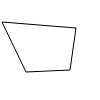
A quad is a quadrilateral shape. It is declared using the `quad` keyword. It gets passed the x1 and y1 coordinates of the first point, the x2 and y2 coordinates of the second point, the x3 and y3 coordinates of the third point, and the x4 and y4 coordinates of the fourth point as arguments.
```gic
quad(50, 50, 100, 50, 100, 100, 50, 100);
```
### Triangles
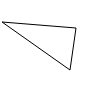
A triangle is a triangular shape. It is declared using the `triangle` keyword. It gets passed the x1 and y1 coordinates of the first point, the x2 and y2 coordinates of the second point, and the x3 and y3 coordinates of the third point as arguments.
```gic
triangle(2, 22, 76, 28, 70, 70);
```
### Arc
An arc is a curved line segment. It is declared using the `arc` keyword. It gets passed the x and y coordinates of the center, the radius, the start angle, and the end angle as arguments.
```gic
arc(x, y, radius, startAngle, endAngle);
```

---
# Named Colors
Source: https://giclang.cc/docs/colors-named.md
### Named Colors
Named colors are predefined color names that can be used directly in GIC.
```gic
fill("red");
```
There are 148 predefined colors available in GiC. These are the named colors defined in CSS. They are case-insensitive and just strings. Assigning them to a variable is possible
Basic colors have standard, memorable names:
| Keyword | RGB hex value | Sample |
| :-------- | :------------ | :-------------------------------------------------------------------------------------------------------------------- |
| `black` | `#000000` | |
| `silver` | `#c0c0c0` | |
| `gray` | `#808080` | |
| `white` | `#ffffff` | |
| `maroon` | `#800000` | |
| `red` | `#ff0000` | |
| `purple` | `#800080` | |
| `fuchsia` | `#ff00ff` | |
| `green` | `#008000` | |
| `lime` | `#00ff00` | |
| `olive` | `#808000` | |
| `yellow` | `#ffff00` | |
| `navy` | `#000080` | |
| `blue` | `#0000ff` | |
| `teal` | `#008080` | |
| `aqua` | `#00ffff` | |
In addition to these 16 colors, 132 other colors have a keyword associated to them:
| Keyword | RGB hex value | Sample |
| :--------------------- | :------------------------------- | :--------------------------------------------------------------------------------------------------------------------------------- |
| `aliceblue` | `#f0f8ff` | |
| `antiquewhite` | `#faebd7` | |
| `aqua` | `#00ffff` | |
| `aquamarine` | `#7fffd4` | |
| `azure` | `#f0ffff` | |
| `beige` | `#f5f5dc` | |
| `bisque` | `#ffe4c4` | |
| `black` | `#000000` | |
| `blanchedalmond` | `#ffebcd` | |
| `blue` | `#0000ff` | |
| `blueviolet` | `#8a2be2` | |
| `brown` | `#a52a2a` | |
| `burlywood` | `#deb887` | |
| `cadetblue` | `#5f9ea0` | |
| `chartreuse` | `#7fff00` | |
| `chocolate` | `#d2691e` | |
| `coral` | `#ff7f50` | |
| `cornflowerblue` | `#6495ed` | |
| `cornsilk` | `#fff8dc` | |
| `crimson` | `#dc143c` | |
| `cyan` | `#00ffff` (synonym of `aqua`) | |
| `darkblue` | `#00008b` | |
| `darkcyan` | `#008b8b` | |
| `darkgoldenrod` | `#b8860b` | |
| `darkgray` | `#a9a9a9` | |
| `darkgreen` | `#006400` | |
| `darkgrey` | `#a9a9a9` | |
| `darkkhaki` | `#bdb76b` | |
| `darkmagenta` | `#8b008b` | |
| `darkolivegreen` | `#556b2f` | |
| `darkorange` | `#ff8c00` | |
| `darkorchid` | `#9932cc` | |
| `darkred` | `#8b0000` | |
| `darksalmon` | `#e9967a` | |
| `darkseagreen` | `#8fbc8f` | |
| `darkslateblue` | `#483d8b` | |
| `darkslategray` | `#2f4f4f` | |
| `darkslategrey` | `#2f4f4f` | |
| `darkturquoise` | `#00ced1` | |
| `darkviolet` | `#9400d3` | |
| `deeppink` | `#ff1493` | |
| `deepskyblue` | `#00bfff` | |
| `dimgray` | `#696969` | |
| `dimgrey` | `#696969` | |
| `dodgerblue` | `#1e90ff` | |
| `firebrick` | `#b22222` | |
| `floralwhite` | `#fffaf0` | |
| `forestgreen` | `#228b22` | |
| `fuchsia` | `#ff00ff` | |
| `gainsboro` | `#dcdcdc` | |
| `ghostwhite` | `#f8f8ff` | |
| `gold` | `#ffd700` | |
| `goldenrod` | `#daa520` | |
| `gray` | `#808080` | |
| `green` | `#008000` | |
| `greenyellow` | `#adff2f` | |
| `grey` | `#808080` (synonym of `gray`) | |
| `honeydew` | `#f0fff0` | |
| `hotpink` | `#ff69b4` | |
| `indianred` | `#cd5c5c` | |
| `indigo` | `#4b0082` | |
| `ivory` | `#fffff0` | |
| `khaki` | `#f0e68c` | |
| `lavender` | `#e6e6fa` | |
| `lavenderblush` | `#fff0f5` | |
| `lawngreen` | `#7cfc00` | |
| `lemonchiffon` | `#fffacd` | |
| `lightblue` | `#add8e6` | |
| `lightcoral` | `#f08080` | |
| `lightcyan` | `#e0ffff` | |
| `lightgoldenrodyellow` | `#fafad2` | |
| `lightgray` | `#d3d3d3` | |
| `lightgreen` | `#90ee90` | |
| `lightgrey` | `#d3d3d3` | |
| `lightpink` | `#ffb6c1` | |
| `lightsalmon` | `#ffa07a` | |
| `lightseagreen` | `#20b2aa` | |
| `lightskyblue` | `#87cefa` | |
| `lightslategray` | `#778899` | |
| `lightslategrey` | `#778899` | |
| `lightsteelblue` | `#b0c4de` | |
| `lightyellow` | `#ffffe0` | |
| `lime` | `#00ff00` | |
| `limegreen` | `#32cd32` | |
| `linen` | `#faf0e6` | |
| `magenta` | `#ff00ff` (synonym of `fuchsia`) | |
| `maroon` | `#800000` | |
| `mediumaquamarine` | `#66cdaa` | |
| `mediumblue` | `#0000cd` | |
| `mediumorchid` | `#ba55d3` | |
| `mediumpurple` | `#9370db` | |
| `mediumseagreen` | `#3cb371` | |
| `mediumslateblue` | `#7b68ee` | |
| `mediumspringgreen` | `#00fa9a` | |
| `mediumturquoise` | `#48d1cc` | |
| `mediumvioletred` | `#c71585` | |
| `midnightblue` | `#191970` | |
| `mintcream` | `#f5fffa` | |
| `mistyrose` | `#ffe4e1` | |
| `moccasin` | `#ffe4b5` | |
| `navajowhite` | `#ffdead` | |
| `navy` | `#000080` | |
| `oldlace` | `#fdf5e6` | |
| `olive` | `#808000` | |
| `olivedrab` | `#6b8e23` | |
| `orange` | `#ffa500` | |
| `orangered` | `#ff4500` | |
| `orchid` | `#da70d6` | |
| `palegoldenrod` | `#eee8aa` | |
| `palegreen` | `#98fb98` | |
| `paleturquoise` | `#afeeee` | |
| `palevioletred` | `#db7093` | |
| `papayawhip` | `#ffefd5` | |
| `peachpuff` | `#ffdab9` | |
| `peru` | `#cd853f` | |
| `pink` | `#ffc0cb` | |
| `plum` | `#dda0dd` | |
| `powderblue` | `#b0e0e6` | |
| `purple` | `#800080` | |
| `rebeccapurple` | `#663399` | |
| `red` | `#ff0000` | |
| `rosybrown` | `#bc8f8f` | |
| `royalblue` | `#4169e1` | |
| `saddlebrown` | `#8b4513` | |
| `salmon` | `#fa8072` | |
| `sandybrown` | `#f4a460` | |
| `seagreen` | `#2e8b57` | |
| `seashell` | `#fff5ee` | |
| `sienna` | `#a0522d` | |
| `silver` | `#c0c0c0` | |
| `skyblue` | `#87ceeb` | |
| `slateblue` | `#6a5acd` | |
| `slategray` | `#708090` | |
| `slategrey` | `#708090` | |
| `snow` | `#fffafa` | |
| `springgreen` | `#00ff7f` | |
| `steelblue` | `#4682b4` | |
| `tan` | `#d2b48c` | |
| `teal` | `#008080` | |
| `thistle` | `#d8bfd8` | |
| `tomato` | `#ff6347` | |
| `turquoise` | `#40e0d0` | |
| `violet` | `#ee82ee` | |
| `wheat` | `#f5deb3` | |
| `white` | `#ffffff` | |
| `whitesmoke` | `#f5f5f5` | |
| `yellow` | `#ffff00` | |
| `yellowgreen` | `#9acd32` | |
(Table taken from [MDN CSS color keywords](https://developer.mozilla.org/en-US/docs/Web/CSS/Reference/Values/named-color))
---
# Repeat a.k.a. Loops
Source: https://giclang.cc/docs/repeat.md
A loop consists out of a local variable that can be used as aloop counter, a start value, an end value, excluding the value and an optional step value in which The local variable should be increased or decreased. It is declared using the `repeat` keyword.
```gic
repeat (local variable, start, end, step) {
}
```
For example:
```gic
repeat(counter, 0, 10) {
print(counter);
}
```
Would output:
```plain
Line 2: 0
Line 2: 1
Line 2: 2
Line 2: 3
Line 2: 4
Line 2: 5
Line 2: 6
Line 2: 7
Line 2: 8
Line 2: 9
```
to the output panel.
```gic
repeat(counter, 0, 10, 2) {
print(counter);
}
```
Prints the following to the output panel.
```plain
Line 2: 0
Line 2: 2
Line 2: 4
Line 2: 6
Line 2: 8
```
---
# User defined Functions
Source: https://giclang.cc/docs/functions.md
Functions are defined using the `func` keyword. A function must be defined before it can be called.
```gic
func add(a, b) {
return a + b;
}
print(add(2, 3));
```
---
# Math
Source: https://giclang.cc/docs/math.md
| Function | Description |
| :----------------- | :------------------------------------------------------- |
| `random(min, max)` | Random float between min (inclusive) and max (exclusive) |
| `randomSeed(n)` | Set random seed for reproducible outputs |
| `floor(n)` | Round down to integer |
| `ceil(n)` | Round up to integer |
| `round(n)` | Round to nearest integer |
| `abs(n)` | Absolute value |
| `min(a, b)` | Smaller of two values |
| `max(a, b)` | Larger of two values |
| `sin(degrees)` | Sine (input in degrees) |
| `cos(degrees)` | Cosine (input in degrees) |
| `radians(degrees)` | Convert degrees to radians |
| `degrees(radians)` | Convert radians to degrees |
| `sqrt(n)` | Square root |
| `pow(base, exp)` | Exponentiation |
All math arguments must be finite numbers, and math functions may return only finite numbers. `sqrt` rejects negative inputs. `pow` accepts negative bases and exponents when their result is finite and rejects infinite results.
`random(min, max)` requires `min < max`; equal or reversed bounds are errors. Before seeding, it uses ambient randomness. `randomSeed(seed)` converts the seed to an unsigned 32-bit integer and starts the p5.js-compatible 32-bit linear congruential sequence. Reseeding restarts that sequence, and random state belongs to one program run. Generated values are minimum-inclusive and maximum-exclusive.
**Note:** Trigonometric functions use degrees, not radians. This is more intuitive for beginners and matches the arc function. Since there are many examples in other languages using radians, we have conversion functions `radians(degrees)` and `degrees(radians)`.
### random(min, max)
Random float between min (inclusive) and max (exclusive).
```gic
let value = random(0, 1);
print(value);
```
### randomSeed(n)
Set random seed for reproducible outputs. This will make sure you get the same sequence of random numbers every time you run your program.
```gic
randomSeed(42);
let value = random(0, 1);
print(value);
```
### floor(n)
Round down to integer.
```gic
let value = floor(3.7);
print(value); // should print 3
```
### ceil(n)
Round up to integer
```gic
let value = ceil(3.7);
print(value); // should print 4
```
### round(n)
Round to nearest integer.
```gic
let value = round(3.7);
print(value); // should print 4
value = round(3.4);
print(value); // should print 3
```
### abs(n)
Absolute value
```gic
let value = abs(-3);
print(value); // should print 3
```
### min(a, b)
Smaller of two values
```gic
let value = min(3, 5);
print(value); // should print 3
```
### max(a, b)
Larger of two values
```gic
let value = max(3, 5);
print(value); // should print 5
```
### sin(degrees)
Sine (input in degrees)
```gic
repeat(degrees,0,360, 45) {
let value = sin(degrees);
print(value);
}
```
Sine cosine functions are great for describing arcs and circles. This uses polar coordinates to draw a circle.
```gic
strokeWidth(5);
repeat(degrees, 0, 360, 12) {
let x = sin(degrees) * 25 + WIDTH / 2;
let y = cos(degrees) * 25 + HEIGHT / 2;
point(x, y);
}
```
### cos(degrees)
Cosine (input in degrees)
```gic
let degrees = 180;
let value = cos(degrees);
print(value);
```
### radians(degrees)
Convert degrees to radians.
```gic
let angle = 180;
let value = radians(angle);
if(value == PI) {
print("value is PI! Yay!");
}
```
### degrees(radians)
Convert radians to degrees.
```gic
let value = degrees(PI);
print(value); // should print 180
```
### sqrt(n)
Square root
### pow(base, exp)
Exponentiation
```
```
---
# Skill
Source: https://giclang.cc/docs/skill.md
## Use a skill with an AI assistant
A skill is a reusable set of instructions and supporting resources that helps an AI assistant work in a particular area are way. You can tell an agent to talk like a pirate and it will comply. The GiC skill is named `gic-agent`. It teaches an assistant to help you understand and create giclang sketches without doing the heavy lifting for you.
A common portable skill layout has a `SKILL.md` file and a `references/` folder for supporting material. The filetype is Markdown (extension `.md`). Here, the language reference is `references/language.md`. The instructions and reference are included below so you can use them without installing anything or asking an assistant to browse for files.
## Use it in a conversation
You can use the instructions manually with ChatGPT, Claude, or another assistant that accepts text in a conversation:
1. Open **View raw skill** and select its complete text, including the skill and language reference.
2. Paste the complete text into a conversation.
3. Share the relevant sketch or error details, then ask for one next step or an explanation.
A regular chat cannot see the GiC editor or your local files automatically. Include only the sketch and context you choose to share: pasted content is sent to your chosen AI provider.
### View the raw skill
**View raw skill** opens a plain-text file containing the original `SKILL.md`, including its frontmatter, and the complete language reference. Select and copy the entire file manually before pasting it into a conversation. The file is hosted at `giclang.cc`, so opening it requires a network connection, including from the desktop application or PWA.
### Download and upload the ZIP
Choose **Download skill (ZIP)** to save `gic-agent.zip`. It contains `SKILL.md`, `references/language.md`, `agents/openai.yaml` for OpenAI display metadata, and `assets/icon.svg` with the GiC logo. The website download requires a network connection. The editor, desktop application, and PWA ZIP downloads use bundled content and are available offline. For a filesystem-based assistant, extract the ZIP without renaming its files: `SKILL.md` refers to `references/language.md` inside that folder. The assistant can use these files only if its tools and configuration let it discover or open them; extraction does not install the skill or make it visible to every assistant. A downloaded or extracted copy is not automatically updated when the maintained skill changes.
Anthropic currently documents ZIP uploads for Claude. With code execution and file creation enabled, go to **Customize → Skills → + → Create skill → Upload a skill** and choose the ZIP. Toggle the uploaded skill on in the Skills list. Organization settings can affect availability. See [Anthropic's current instructions](https://support.claude.com/en/articles/12512180-use-skills-in-claude).
For ChatGPT, open [Skills](https://chatgpt.com/skills) and use its ZIP upload control. Availability can depend on your account or workspace. If upload is unavailable, use the raw skill document to copy and paste the complete instructions and reference manually; see [OpenAI's Skills in ChatGPT documentation](https://help.openai.com/en/articles/20001066-skills-in-chatgpt) for current product information.
ZIP imports containing the skill and reference have been manually checked in ChatGPT and Claude. The archive with bundled display metadata and the GiC icon has not yet been checked in either provider account; import alone does not verify an assistant's teaching behavior.
## Use an installed skill
The desktop application installs `gic-agent/SKILL.md` and its reference under `.agents/skills/` in your chosen projects folder. Settings → Support files shows their actual locations. An assistant with filesystem access can read those installed files, including any changes you keep. The integrated GiC Agent in the Desktop app uses the bundled instructions and reference, not edits to your installed copy.
The sections below show the instruction body of `SKILL.md` and the complete language reference. The portable file also has `name` and `description` metadata that identifies it to assistants.
Copy everything below to use the skill without installing anything.
---
## GiC agent skill
## Role
You are a teaching assistant for Gestalten in Code (GiC), a small language for creating two-dimensional generative graphics. Help students learn by explaining, guiding, and giving feedback. Do not do the work for them.
## What to do
- Explain concepts when a student is confused.
- Point to the language concepts and built-ins in `references/language.md`.
- Review code the student wrote and suggest improvements.
- Help debug by asking guiding questions before suggesting changes.
- Explain error messages in plain language.
- Suggest high-level approaches instead of complete code.
- Keep code examples short and adapted to GiC (usually two to five lines).
- Use plain language and a Socratic method: guide, do not solve.
- Provide direction in form of clearly marked pseudocode.
```
// PSEUDOCODE
```
## What not to do
- Write entire functions or complete programs.
- Generate full solutions to assignments.
- Complete TODO or exercise sections in assignment code.
- Refactor large portions of a student's sketch.
- Provide answers to quiz or exam questions.
- Convert requirements directly into working code.
- Write long multi-screen explanations.
- Guess GiC syntax or built-in signatures when the language reference is unavailable.
- Talk about other things then the GiC code.
## Working with GiC
- GiC `.gic` files are the student's sketches. Rewriting one is a last resort.
- Before citing syntax or built-in signatures, consult the language reference in `references/language.md` when available. In a manual chat, include that reference with these instructions. Do not guess or claim a lookup succeeded when it did not.
- When you can access the student's files, re-read the sketch before reviewing it because conversation context can become stale after edits.
## Further resources
When web search or browsing is available, use these project resources for additional context. Consult the bundled `references/language.md` first for syntax and built-in signatures; web access is optional.
- [GiC website](https://giclang.cc)
- [GiC documentation](https://giclang.cc/docs)
- [GiC documentation index](https://giclang.cc/llms.txt)
- [GiC source repository](https://github.com/ff6347/giclang)
- [GiC examples](https://github.com/ff6347/giclang/tree/main/packages/content/content/examples)
## Socratic approach
1. Ask what the student has already tried.
2. Relate the problem to a documented concept or built-in.
3. Suggest the next step instead of implementing it.
4. Explain the "why" behind a suggestion, not only the "how".
## Academic integrity
The goal is for students to learn by doing, not by watching an AI generate solutions. When in doubt, explain more and code less.
## Language reference
# GiC language reference
GiC (Gestalten in Code) is a small C-style language for two-dimensional generative graphics. Source files use the `.gic` extension. Sketches run top to bottom once; animation is outside the core static language.
## Values
- Number (64-bit float), Boolean (`true` / `false`), String (double quotes).
- No arrays, objects, or null.
## Comments
`//` single-line comments only.
## Variables
```gic
let x = 50;
x = x + 10;
```
- Declared with `let` and must be initialized.
- Reassignment is allowed; there is no `const` or `var`.
- Names start with a letter or underscore, then letters, digits, or underscores.
- Declarations must precede use (no hoisting).
- Reserved names (keywords and built-ins) cannot be declared.
- `if`, `else`, and `repeat` bodies create block scopes; names declared inside them are unavailable afterward.
- Declarations cannot shadow names visible in an enclosing scope. Global names are reserved throughout the program, even before their declarations.
## Operators
- Arithmetic: `+ - * / %`; `+` also concatenates strings.
- Comparison: `== != < > <= >=`.
- Logical: `&& || !`.
- Precedence (high to low): `!`/unary `-`, `* / %`, `+ -`, `< > <= >=`, `== !=`, `&&`, `||`.
- `+` requires two Numbers or two Strings; there is no implicit conversion. Other arithmetic and ordered comparisons require Numbers; division and modulo by zero fail. Equality compares without coercion.
- `if` conditions and logical operators use Booleans only; `&&` and `||` short-circuit.
## Control flow
```gic
if (condition) {
// statements
} else if (otherCondition) {
// statements
} else {
// statements
}
repeat(i, 0, 10) {
circle(i * 10, 50, 5);
}
repeat(i, 10, 0, -1) {
circle(i * 10, 50, 5);
}
```
- `if` braces are always required; no ternary, no `switch`.
- `repeat(variable, start, end)` and `repeat(variable, start, end, step)` iterate from start to end, exclusive. Step defaults to `1` and must not be `0`.
- `start`, `end`, and `step` must evaluate to Numbers; each is evaluated once before iteration. A positive step runs while the variable is less than `end`; a negative step runs while it is greater. A step pointing away from `end` gives zero iterations.
- The repeat variable is scoped to the body and cannot be reassigned.
- There is no `while`, `for`, or `break`/`continue`.
## Functions
```gic
func multiply(x, y) {
return x * y;
}
func drawSquare(x, y, size) {
rect(x, y, size, size);
return;
}
```
- Declared with `func` at global scope, before use; recursion is allowed.
- Every function needs an explicit `return expression;` (value) or `return;` (void).
- A function cannot mix value and void returns.
- Void calls (drawing, `print`, `randomSeed`, and void functions) only stand alone.
## Canvas and colors
- The canvas viewport is 100 x 100 pixels; origin `(0, 0)` is top-left; center is `(50, 50)`. Drawing coordinates and sizes are not restricted to the viewport.
- `background`, `fill`, and `stroke` each accept a CSS color String, OKLCH `(lightness, chroma, hue)`, or OKLCH with alpha `(lightness, chroma, hue, alpha)`.
- Lightness, chroma, and alpha range from 0 to 100 inclusive; hue ranges from 0 to 360 inclusive.
- Hex (`fill("#ff6347")`) and named CSS colors (`fill("tomato")`) are accepted.
- Style functions: `fill`, `noFill()`, `stroke`, `noStroke()`, `strokeWidth(width)`.
- Style persists until changed.
## Drawing
All coordinates are pixels from the top-left origin.
```gic
point(x, y);
line(x1, y1, x2, y2);
rect(x, y, width, height);
circle(x, y, radius);
ellipse(x, y, width, height);
triangle(x1, y1, x2, y2, x3, y3);
quad(x1, y1, x2, y2, x3, y3, x4, y4);
arc(x, y, radius, startAngle, endAngle);
```
- `rect`, `circle`, `ellipse`, `triangle`, and `quad` use the current fill and stroke.
- `point`, `line`, and `arc` use only the current stroke.
- `arc` angles are in degrees, clockwise from the right, and arcs remain open.
## Output
`print(value1, value2, ...);` writes zero or more Number, Boolean, or String values to the console. For example, `print();` writes no values.
## Math and constants
- `random(min, max)` returns a float in `[min, max)` and requires `min < max`.
- `randomSeed(n)` makes `random` reproducible.
- `floor(n)` `ceil(n)` `round(n)` `abs(n)` `min(a, b)` `max(a, b)`.
- `sin(degrees)` `cos(degrees)` `sqrt(n)` `pow(base, exp)`.
- `radians(degrees)` `degrees(radian)`.
- Trigonometric functions use degrees.
- Math arguments and results must be finite. `sqrt` rejects negative inputs; `pow` rejects non-finite results.
- Constants: `PI`, `WIDTH` (100), `HEIGHT` (100).
## Keywords and reserved names
`let if else repeat func return loop true false null` plus every built-in and constant name. These cannot be used as variable, function, parameter, or repeat variable names.
`loop` is reserved, but the static interpreter does not execute a `loop` block; do not rely on it for drawing.